Chat Completions
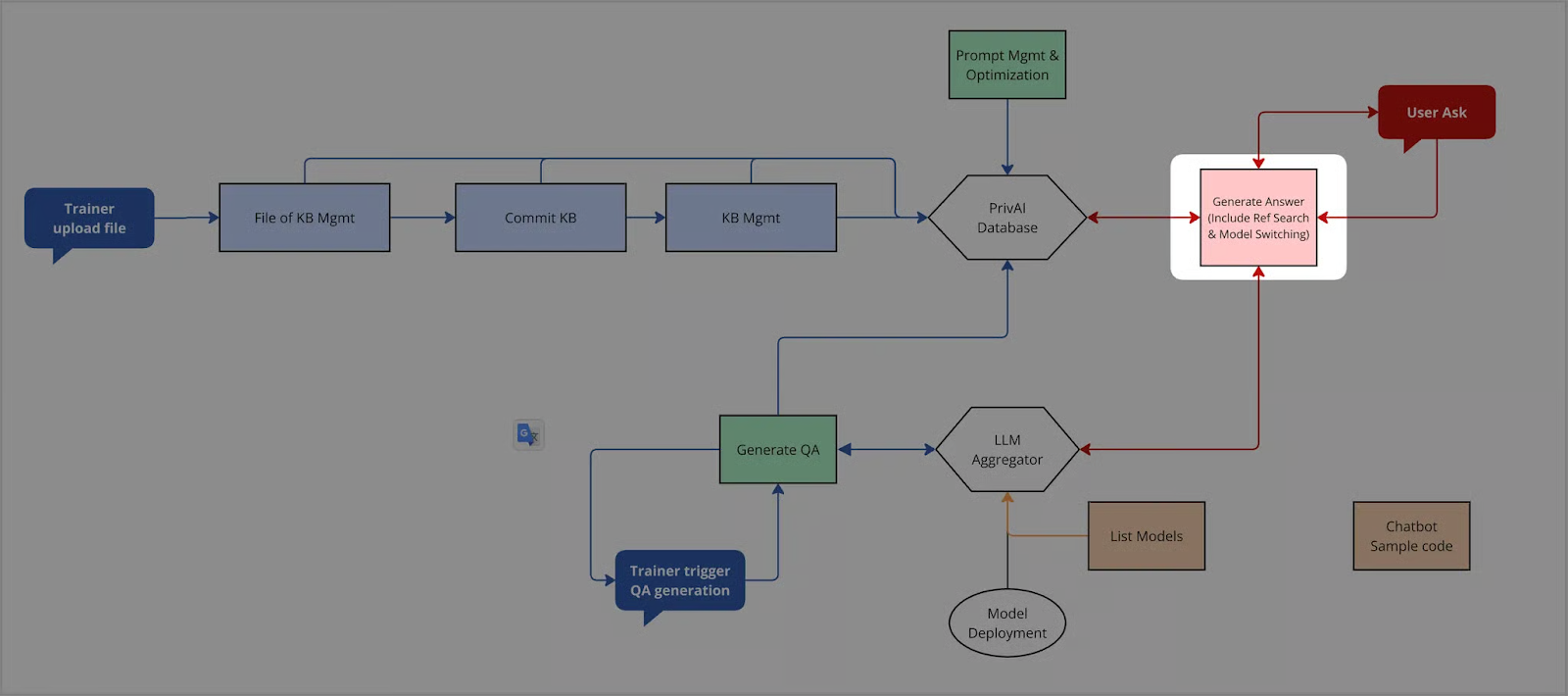
此 API 用於與語言模型(LLM)進行聊天推論,可搭配指定的 Prompt、Fileset(作為知識來源)與模型進行 RAG 生成,若需在推論過程中引用特定檔案內容,可透過 messages 指定檔案進行生成。
對話摘要(Summary)功能:支援自動或強制將上一輪摘要帶入 Context Window,以提升長對話的記憶能力與準確度。
此外,PrivAI 的 Chat Completions API 也支援透過 tools 欄位提供工具定義,讓模型在推理過程中可視需求呼叫外部工具,以擴展 AI Agent 的能力。
tools 為選填欄位,支援:
-
Function Tool
-
MCP Tool
PrivAI 的 Chat Completions API 支援傳入與 Responses API tools 欄位相容的 MCP Tool 定義格式。
本階段 MCP 僅支援 remote MCP / MCP connector,也就是透過 HTTP URL 連接的外部 MCP server,並同時支援 Stream 與 Non-Stream 模式。
此外,Chat Completions API 現已支援在單一請求中指定單一或多個 filesets 進行 RAG 問答:
-
支援透過
fileset_ids傳入一個或多個 fileset ID -
fileset_id為舊版欄位,現已棄用(deprecated),僅保留向後相容性,不建議使用 -
請勿同時傳入
fileset_id與fileset_ids -
若
fileset_ids為空陣列[],則視為未指定 fileset,系統不會執行 RAG -
若
fileset_ids僅包含單一元素,則其效果等同於單一 fileset 查詢
curl -X 'POST' \
  'http://127.0.0.1:8000/v1/chat/completions' \
  -H 'accept: application/json' \
  -H 'Authorization: Bearer <your-api-key>' \
  -H 'Content-Type: application/json' \
  -d '{
    "fileset_ids": [
      "01a51c51-8a07-46df-b1fc-1c6e6461b44f",
      "13db6bfa-6f92-4d75-9d3c-9edeb4f8d1d2"
    ],
    "messages": [
      {
        "role": "user",
        "content": "What is APMIC?"
      }
    ],
    "model": "ace-1-24b-reasoning-v1",
    "prompt_id": "6afecc03-ef73-4aa9-8ea6-88098047f3a2",
    "return_summary": true,
    "stream": true,
    "summary": "Previous context about AI technology...",
    "with_summary": "auto"
  }'
Request Headers
| Key | Value |
|---|---|
| Request Method | POST |
| accept | application/json |
| Authorization | Bearer <your-api-key> |
| Content-Type | application/json |
Request Payload
基本 Request Payload 範例(單一 Fileset)
{
  "fileset_id":"01a51c51-8a07-46df-b1fc-1c6e6461b44f",
  "messages": [
    {
      "role":"user",
      "content":"What is APMIC?"
    }
  ],
  "model":"ace-1-24b-reasoning-v1",
  "prompt_id":"6afecc03-ef73-4aa9-8ea6-88098047f3a2",
  "return_summary":true,
  "stream":true,
  "summary":"Previous context about AI technology...",
  "with_summary":"auto"
}
使用多個 Filesets 進行 RAG
{
  "fileset_ids": [
"01a51c51-8a07-46df-b1fc-1c6e6461b44f",
"13db6bfa-6f92-4d75-9d3c-9edeb4f8d1d2",
"ae3f1c0f-3d6d-4c2c-8fd8-2fbf65e8d991"
  ],
  "messages": [
    {
      "role":"user",
      "content":"Please summarize APMIC and its products."
    }
  ],
  "model":"ace-1-24b-reasoning-v1",
  "prompt_id":"6afecc03-ef73-4aa9-8ea6-88098047f3a2",
  "stream":false
}
fileset_ids 為空陣列(不做 RAG)
{
  "fileset_ids": [],
  "messages": [
    {
      "role":"user",
      "content":"What is APMIC?"
    }
  ],
  "model":"ace-1-24b-reasoning-v1",
  "stream":false
}
根據檔案進行對話
{
  "fileset_id":"01a51c51-8a07-46df-b1fc-1c6e6461b44f",
  "messages": [
    {
      "role":"user",
      "content": [
        {
          "type":"file",
          "file": {
            "file_id":"b0d1bdbc-4f94-40b0-9358-68c579c99e8c",
            "quality":"STD"
          }
        },
        {
          "type":"text",
          "text":"What is APMIC?"
        }
      ]
    }
  ],
  "model":"ace-1-24b-reasoning-v1",
  "prompt_id":"6afecc03-ef73-4aa9-8ea6-88098047f3a2",
  "return_summary":true,
  "stream":true,
  "summary":"Previous context about AI technology...",
  "with_summary":"auto"
}
使用 MCP Tool
{
  "messages": [
    {
      "role":"user",
      "content":"請幫我使用 deepwiki 查詢某個專案說明"
    }
  ],
  "model":"ace-1-24b-reasoning-v1",
  "tools": [
    {
      "type":"mcp",
      "server_label":"deepwiki",
      "server_url":"https://example-mcp-server.com/mcp",
      "require_approval":"never"
    }
  ],
  "stream":true
}
Field Explanation
| Field | Type | Detail | Required |
|---|---|---|---|
| fileset_id | string | uuid,指定單一 Knowledge Base | false |
| fileset_ids | array[string] | 指定多個 fileset ids 進行 RAG;建議最多 5 個,但不強制限制。不可與 fileset_id 同時使用。若為空陣列 [],視為未指定 fileset,不執行 RAG。 | false |
| messages | array | 對話的內容列表,與 OpenAI 的格式相容 | true |
| model | string | 指定對話的 LLM Model | true |
| prompt_id | string | uuid,指定對話所使用的 Prompt | false |
| stream | boolean | 是否 streaming 輸出,預設為 false | false |
| tools | array | 工具定義列表,為選填欄位,可包含 Function Tool 與 MCP Tool | false |
Other Fields
| Field | Type | Detail | Required |
|---|---|---|---|
| prompt | string | 直接輸入 Prompt 內容 | false |
| temperature | float | 0.0-1.0,控制生成文字隨機性 | false |
| return_summary | boolean | 是否在回應中產生並回傳本次對話的摘要。 | |
true:系統將計算前 N 輪(最多 10)加上本次對話進行摘要並回傳;false:不產生摘要。 | false | ||
| with_summary | string | auto、force,設定如何處理摘要。 | |
auto:使用模型自動判斷是否將摘要帶入 Context Window; | |||
force:強制將上一輪摘要帶入 Context Window。 | |||
若未提供 summary 欄位,此參數無作用。 | false | ||
| summary | string | 提供摘要內容字串 | false |
多 Filesets 的 RAG 行為
當請求中指定 fileset 時,系統會依下列規則執行 RAG:
| 情境 | 行為 |
|---|---|
僅提供 fileset_id | 維持原本單一 fileset 的 RAG 行為 |
fileset_ids 長度為 1 | 行為與單一 fileset 相同,以降低額外 overhead |
fileset_ids 長度大於 1 | 系統會同時對所有 filesets 做 RAG search,合併取回的 chunks,並對合併後的 chunks 做 rerank,取 top n(預設 n = 5)後放入 context window |
fileset_ids 為 [] | 視為未指定 fileset,不做 RAG |
同時提供 fileset_id 與 fileset_ids | 視為無效請求,回傳 400 Bad Request |
補充說明:
-
多 filesets 模式下,若任一 fileset 發生錯誤,整個 request 會失敗
-
目前暫不處理跨 fileset 的重複文件 / chunk deduplicate
-
使用舊的
fileset_id時,除了新增referenced_chunks回傳外,其他行為不變
tools
tools 為選填欄位,用於提供模型在推理過程中可使用的工具定義。
當模型根據使用者輸入、系統提示與工具描述判斷需要額外工具協助時,可於推理過程中觸發工具呼叫。
tools 可接受以下類型:
-
Function Tool
-
MCP Tool
PrivAI 的 Chat Completions API 支援傳入與 Responses API tools 欄位相容的 MCP Tool 定義格式。
說明
-
tools可省略 -
當未提供
tools時,系統將以一般聊天 / RAG 模式進行推論 -
當提供
tools時,模型可視需求選擇是否呼叫工具 -
同一請求中可包含多個工具定義
-
tools同時支援 Stream 與 Non-Stream 模式
MCP Tool
MCP Tool 用於透過 MCP(Model Context Protocol)整合外部工具與資源,使模型可在推理過程中存取更多外部能力。
PrivAI 支援於 Chat Completions API 的 tools 欄位中傳入 MCP Tool 定義。
本階段支援範圍
-
支援與 Responses API
tools欄位相容的 MCP Tool 定義格式 -
僅支援 remote MCP / MCP connector
-
僅支援透過 Streamable HTTP 連接的外部 MCP server
本階段不支援
-
local MCP server
-
SSE 型態的 MCP server
-
非 HTTP 型態的 MCP 連線方式
範例
{
  "type":"mcp",
  "server_label":"deepwiki",
  "server_url":"https://example-mcp-server.com/mcp",
  "require_approval":"never"
}
欄位說明
| Field | Type | Detail | Required |
|---|---|---|---|
| type | string | 固定為 mcp | true |
| server_label | string | MCP server 的識別名稱 | true |
| server_url | string | 外部 MCP server 的 HTTP URL | true |
| require_approval | string | 工具呼叫是否需要額外核准;**目前僅支援固定值 **never | false |
補充說明
-
PrivAI 會在平台內部處理 MCP client 邏輯
-
PrivAI 會將 MCP Tool 定義轉換為底層模型系統可理解的 native tool spec
-
對開發者而言,只需於
tools中傳入 MCP Tool 定義即可使用
Response Body
當 stream=false 時,系統會於完成模型推理、RAG 檢索與必要的工具呼叫後,一次性回傳完整回應。
若使用 tools:
-
若模型未選擇呼叫工具,回應行為與一般聊天相同
-
若模型選擇呼叫工具,系統會先完成工具執行,再將結果整合進最終回應
-
若工具執行失敗,系統將依統一錯誤格式回傳錯誤資訊
若本次請求有使用 fileset_id 或 fileset_ids 並成功執行 RAG,response 會額外回傳 referenced_chunks,表示最終經 rerank 後、真正放入 context window 的 chunks。若未指定 fileset,則 referenced_chunks 可為 null 或不回傳。
{
  "id":"chatcmpl-9e9ddff2-78c7-4de9-8995-f5f99647c6bf",
  "choices": [
    {
      "finish_reason":"stop",
      "index":0,
      "logprobs":null,
      "message": {
        "content":"\n\nAPMIC (Accelerate Private Machine Intelligence Company) is a Taiwan-based AI software company specializing in natural language understanding and generation ...",
        "refusal":null,
        "role":"assistant",
        "annotations":null,
        "audio":null,
        "function_call":null,
        "tool_calls":null,
        "reasoning_content":"\nOkay, the user asked about APMIC. Let me start by recalling what I know.\n...\n"
      }
    }
  ],
  "created":1761980000,
  "model":"ace-1-24b-reasoning-v1",
  "object":"chat.completion",
  "service_tier":null,
  "system_fingerprint":null,
  "usage": {
    "completion_tokens":1000,
    "prompt_tokens":1500,
    "total_tokens":3000,
    "completion_tokens_details":null,
    "prompt_tokens_details":null
  },
  "summary":"User asked about what's APMIC. ...",
  "referenced_chunks": [
    {
      "id":"c6c92ac0-745a-43b6-aa30-53f2c9ff57aa",
      "metadata": {
        "__APMICTextSplitter__h1":"...",
        "file_id":"25468ceb-bf0a-44c5-9c9b-13cd4241ccef",
        "fileset_id":"7d7765de-faa9-4771-8c9c-ca49d844ce92",
        "filename":"example.png",
        "filetype":"image/png",
        "start_index":0,
        "end_index":0,
        "_distance":0.7495614886283875,
        "score":0.25043851137161255,
        "relevance_score":0.5205078125,
        "rerank_logit":0.82177734375
      },
      "page_content":"...",
      "type":"Document"
    }
  ]
}
Response Field Explanation
| Field | Detail |
|---|---|
| id | 對話紀錄的唯一鍵 |
| choices[] | LLM 回覆列表 |
| choices[].finish_reason | (與 OpenAI 相容而保留) |
| choices[].index | (與 OpenAI 相容而保留) |
| choices[].logprobs | (與 OpenAI 相容而保留) |
| choices[].message | 推論結果 |
| choices[].message.content | 推論結果的文字內容 |
| choices[].message.refusal | (與 OpenAI 相容而保留) |
| choices[].message.role | (與 OpenAI 相容而保留) |
| choices[].message.annotations | (與 OpenAI 相容而保留) |
| choices[].message.audio | (與 OpenAI 相容而保留) |
| choices[].message.function_call | (與 OpenAI 相容而保留) |
| choices[].message.tool_calls | 工具呼叫資訊;若模型選擇呼叫 Function Tool 或 MCP Tool,將出現在此欄位 |
| choices[].message.reasoning_content | 思考過程的 Token |
| created | 對話建立的時間 |
| model | 對話使用的模型 |
| object | (與 OpenAI 相容而保留) |
| service_tier | (與 OpenAI 相容而保留) |
| system_fingerprint | (與 OpenAI 相容而保留) |
| usage | 用量統計物件 |
| usage.completion_tokens | Output Token |
| usage.prompt_tokens | Prompt Token |
| usage.total_tokens | Token 總數 |
| usage.completion_tokens_details | (與 OpenAI 相容而保留) |
| usage.prompt_tokens_details | (與 OpenAI 相容而保留) |
| summary | 本次對話結束後生成的摘要內容 |
| referenced_chunks | 最終經 rerank 後、實際放入 context window 的 chunks。若未指定 fileset,可為 null 或不回傳。 |
Referenced Chunk 結構說明
referenced_chunks 中每個元素的結構與現有 chunk 結構相同,但其 metadata 中會額外包含 fileset_id,用於標示該 chunk 來自哪一個 fileset。
| Field | Detail |
|---|---|
| referenced_chunks[].id | chunk 的唯一識別值 |
| referenced_chunks[].metadata.file_id | 該 chunk 所屬的原始檔案 ID |
| referenced_chunks[].metadata.fileset_id | 該 chunk 所屬的 fileset ID |
| referenced_chunks[].metadata.filename | 原始檔名 |
| referenced_chunks[].metadata.filetype | 原始檔案類型 |
| referenced_chunks[].metadata.start_index | chunk 起始位置 |
| referenced_chunks[].metadata.end_index | chunk 結束位置 |
| referenced_chunks[].metadata._distance | 原始向量檢索距離 |
| referenced_chunks[].metadata.score | score的 range 都是 [0..1] ,數值越高越好 |
| referenced_chunks[].metadata.relevance_score | rerank / relevance 分數 |
| referenced_chunks[].metadata.rerank_logit | reranker logit |
| referenced_chunks[].page_content | chunk 內容 |
| referenced_chunks[].type | 固定為 Document |
Stream Response
當 stream=true 時,系統會以串流方式逐步回傳模型輸出內容。
若推理過程中觸發工具呼叫,則除了模型輸出片段外,也可能回傳與工具執行相關的 chunk。
當工具執行完成後,系統可回傳 role = "tool" 的 chat.completion.chunk,表示工具輸出結果。
若本次請求有使用 fileset_id 或 fileset_ids 並成功執行 RAG,系統會在最後一個 chunk 中回傳 referenced_chunks,位置與 summary 相同。若未指定 fileset,則 referenced_chunks 可為 null 或不回傳。
Tool Response Chunk 範例
{
  "id":"chatcmpl-c2a1273b-12a0-4486-a0aa-4ef2c8013b27",
  "choices": [
    {
      "delta": {
        "content":"...",
        "function_call":null,
        "refusal":null,
        "role":"tool",
        "tool_calls":null,
        "tool_call_id":"chatcmpl-tool-5513b91b1af44f6c91d89ec6aed1eb7c",
        "tool_call_index":1
      },
      "finish_reason":null,
      "index":0,
      "logprobs":null
    }
  ],
  "created":1772010876,
  "model":"ace-2-27b",
  "object":"chat.completion.chunk",
  "service_tier":null,
  "system_fingerprint":null,
  "usage":null
}
最後一個 Stream Chunk 範例(含 summary 與 referenced_chunks)
{
  "id":"chatcmpl-final-123",
  "choices": [
    {
      "delta": {},
      "finish_reason":"stop",
      "index":0,
      "logprobs":null
    }
  ],
  "created":1772010999,
  "model":"ace-1-24b-reasoning-v1",
  "object":"chat.completion.chunk",
  "summary":"User asked about APMIC and related products...",
  "referenced_chunks": [
    {
      "id":"c6c92ac0-745a-43b6-aa30-53f2c9ff57aa",
      "metadata": {
        "file_id":"25468ceb-bf0a-44c5-9c9b-13cd4241ccef",
        "fileset_id":"7d7765de-faa9-4771-8c9c-ca49d844ce92",
        "filename":"example.png",
        "filetype":"image/png",
        "start_index":0,
        "end_index":0,
        "_distance":0.7495614886283875,
        "score":0.25043851137161255,
        "relevance_score":0.5205078125,
        "rerank_logit":0.82177734375
      },
      "page_content":"...",
      "type":"Document"
    }
  ]
}
Stream Chunk 欄位說明
| Field | Detail |
|---|---|
| object | 固定為 chat.completion.chunk |
| choices[].delta.role | 為 tool 時,表示此 chunk 為工具輸出 |
| choices[].delta.content | 工具輸出內容 |
| choices[].delta.tool_call_id | 對應原始工具呼叫的識別值 |
| choices[].delta.tool_call_index | 用於標示工具呼叫順序 |
| summary | 若啟用摘要功能,會在最後一個 chunk 回傳 |
| referenced_chunks | 若有進行 RAG,會在最後一個 chunk 回傳最終使用的 referenced chunks |
Advanced Prompt Overrides
為了讓進階使用者更靈活測試底層模型的行為,我們提供 prompt 欄位支援 Special Token。這些 token 可用來跳過預設的 prompt 或清空 prompt 結構,讓使用者直接測試模型底層行為。這項設計適合進行模型對比、真實語言測試、精準調參等進階應用。
| Special Token | Description |
|---|---|
<NO_PROMPT> | 不使用任何 prompt,模型只處理後續文字,適合測試裸模型行為 |
<IGNORE_SYSTEM_PROMPT> | 忽略系統預設的 system prompt,僅使用此欄位內容作為提示,適合完全自定義輸入 |
摘要機制
-
摘要來源:摘要需由當次 request 主動帶入,目前系統不會自動儲存或延續先前對話摘要
-
Message 計算:
file + text的混合訊息或單純assistant + user的互動皆算作一輪對話。 -
使用情境:
-
若第一次對話將
return_summary設定為false,則第二次對話即使將with_summary設定為force,因無前次摘要紀錄,將不會有任何摘要被帶入(除非手動填寫summary欄位)。
注意事項
-
tools為選填欄位 -
tools可同時支援 Function Tool 與 MCP Tool -
MCP Tool 僅支援 remote MCP / MCP connector
-
MCP Tool 僅支援透過 HTTP URL 連接的外部 MCP server
-
Stream 與 Non-Stream 模式皆支援
tools -
Chat Completions API 的租戶範圍與資料隔離規則仍依既有 API Key / Tenant Scope 生效
-
若工具流程中涉及 PrivAI 內部資源,仍應遵循既有租戶限制
-
fileset_id與fileset_ids不可同時使用 -
fileset_ids建議最多 5 個,但不強制限制 -
多 filesets 模式下,若任一 fileset 發生錯誤,整個 request 會失敗
錯誤情境
當請求使用 tools,尤其是 MCP Tool 時,可能出現以下錯誤情境:
-
工具定義格式錯誤
-
MCP server URL 格式錯誤
-
MCP server 無法連線
-
MCP tool 執行逾時
-
傳入不支援的 MCP transport 類型
當請求使用 RAG 並指定 fileset 時,還可能出現以下錯誤情境:
-
同時提供
fileset_id與fileset_ids -
指定的 fileset 不存在
-
指定的 fileset 尚未完成,無法用於 RAG
-
多 filesets 模式下,任一 fileset 發生錯誤而導致整個 request 失敗
系統將依既有統一錯誤格式回傳錯誤資訊。